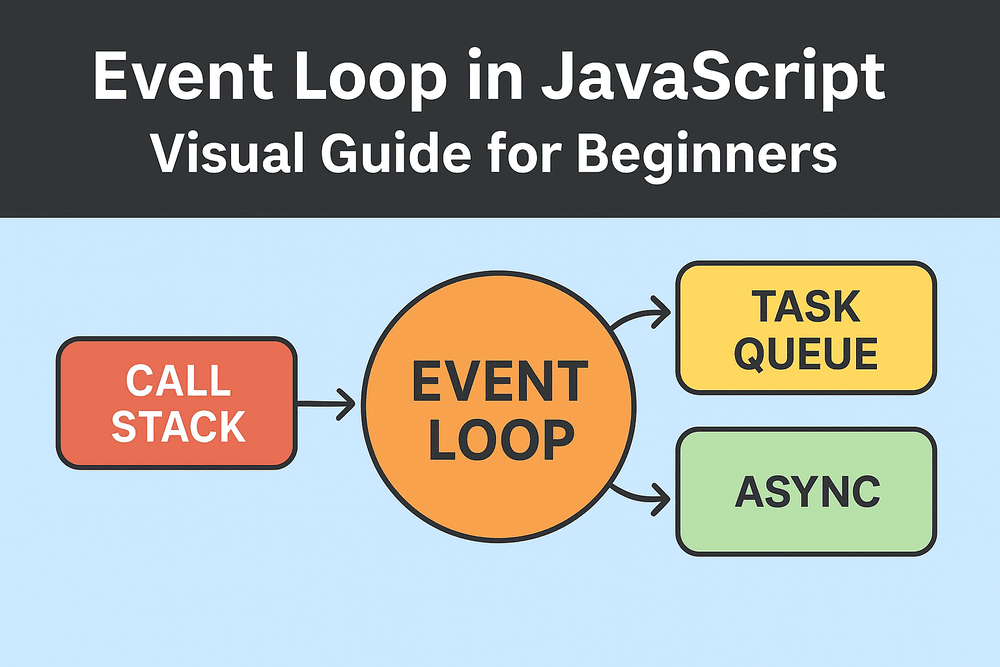
The JavaScript event loop lets a single-threaded runtime handle
async work. It empties the call stack, runs microtasks (Promises), then handles macrotasks (setTimeout, UI
events) so the UI stays responsive.
Introduction
Alright, let’s demystify something every JS dev must know: the event loop. Think of
JavaScript as a single chef in a busy kitchen. The chef (the JS runtime) does one thing at a time, but
orders (async tasks) keep coming. The event loop is the manager who decides which order to cook next.
If you’ve ever wondered why Promise.then() sometimes beats setTimeout(..., 0),
or why your UI freezes even without an obvious heavy loop — this article is for you. Code examples
included. Play with them in the console. I did — many times, in cafes. 🙂
Call Stack and Single Threaded Nature
The call stack is simple: last-in, first-out. When you call a function, it goes on the stack; when it
returns, it pops off. Synchronous code blocks the stack. So if you write a while-loop that never breaks,
the UI freezes. Oops.
Example: simple stack behavior
function a(){ console.log('a start'); b(); console.log('a end'); } function b(){ console.log('b'); } a();Output order: a start → b → a end. Simple, predictable. No
surprises here.
Tasks vs Microtasks
Here’s where people trip up. There are two important queues:
- Microtask Queue (Jobs) — Promises (
.then,async/await
continuations),queueMicrotask. - Task Queue (Macrotasks) —
setTimeout,setInterval, DOM
events, rendering tasks.
When the call stack empties, microtasks run before macrotasks. So Promises typically win the
race against setTimeout(..., 0).
Event Loop Step-by-Step
A simplified tick is:
- Run one macrotask (take from task queue, push to call stack).
- Let it run; synchronous code executes.
- When the call stack is empty, drain the microtask queue completely.
- Update rendering if needed.
- Repeat.
This is why too many microtasks can block rendering — the browser waits until microtasks finish before
painting. Annoying, yes. Avoid long microtask chains.
Code Examples
Example 1: Promise vs setTimeout ordering
console.log('script start');

setTimeout(() => console.log('setTimeout'), 0);

Promise.resolve().then(() => console.log('promise1')).then(() => console.log('promise2'));

console.log('script end');
Expected output:
script start script end promise1 promise2 setTimeoutPromises are microtasks — they run after the call stack clears but before macrotasks like
setTimeout.
Example 2: async/await is syntactic sugar over Promises
async function foo(){ console.log('foo start'); await bar(); console.log('foo end'); } function bar(){ console.log('bar'); return Promise.resolve(); }

console.log('script start');
foo();
console.log('script end');
Output:
script start foo start bar script end foo endawait pauses foo and schedules the continuation as a microtask. Neat, right?
Common Gotchas
Long microtask chains block rendering
If you enqueue lots of microtasks (for instance, Promise chains that keep scheduling more Promises), the
runtime runs them all before giving control back to the browser. So the UI can freeze even without heavy
synchronous loops. Seen this in production — not fun.
setTimeout(..., 0) is not immediate
Browsers clamp timers, and setTimeout callbacks are macrotasks. They run after microtasks —
so don’t expect them to run “immediately”.
Relying on order between different async primitives
Assuming setTimeout will run before a Promise resolution is a bug. Promises (microtasks) run
earlier.
Visualizing with a Timeline
Imagine each event-loop tick as:
- Execute one macrotask (like handling a click).
- Run all microtasks triggered by it.
- Then render (if necessary).
So: macrotask → microtasks → paint. Repeat. If you want smoother animations, let the browser paint by not
starving it with microtasks.
Further Examples and Patterns
Example 3: Using queueMicrotask directly
console.log('start'); queueMicrotask(() => console.log('microtask')); setTimeout(() => console.log('timeout'), 0); console.log('end');Output:
start end microtask timeoutqueueMicrotask is a low-level way to schedule microtasks. Useful sometimes.
Practical pattern: batching updates
If you must process many items without blocking the UI, chunk the work. Process a small batch, then
setTimeout(..., 0) or requestAnimationFrame the next batch. Web Workers are
great for heavy computation — offload work entirely.
FAQ
Q1: Is JavaScript truly single-threaded?
A: The code execution environment is
single-threaded (call stack). But browsers/Node have multiple threads behind the scenes for I/O,
rendering, etc.
Q2: Which runs first — setTimeout or Promise.then?
A: Promise.then
(microtask) runs before setTimeout callbacks (macrotasks) after the current call stack
empties.
Q3: Can microtasks starve rendering?
A: Yes. If many microtasks are queued
continuously, the browser may not get a chance to render.
Q4: How to delay work without blocking UI?
A: Break work into chunks and schedule
via setTimeout, requestAnimationFrame, or use Web Workers for heavy compute.
Q5: Are web workers part of the event loop?
A: Web Workers have their own event loop
— they don’t block the main thread and communicate via messages.
Closing notes
Understanding the event loop makes debugging async behavior so much easier. Try the examples in the
browser console. Tinker. I remember breaking an app at 2 AM because I forgot that await
schedules a microtask — rookie mistake. Another time, I optimized a dashboard by batching DOM writes;
CPU drop was dramatic. Small wins, big smiles.
Go experiment. You’ll get the hang of it. Cheers.